 NORA
Tattoo artist calendar
Your sessions and your personal life in one calendar
Nora shows your sessions next to your Google Calendar, Apple Calendar or Outlook appointments. Your confirmed sessions also show up in your usual calendar.
€24.90/month at the launch price · no commitment · 0% commission on your deposits
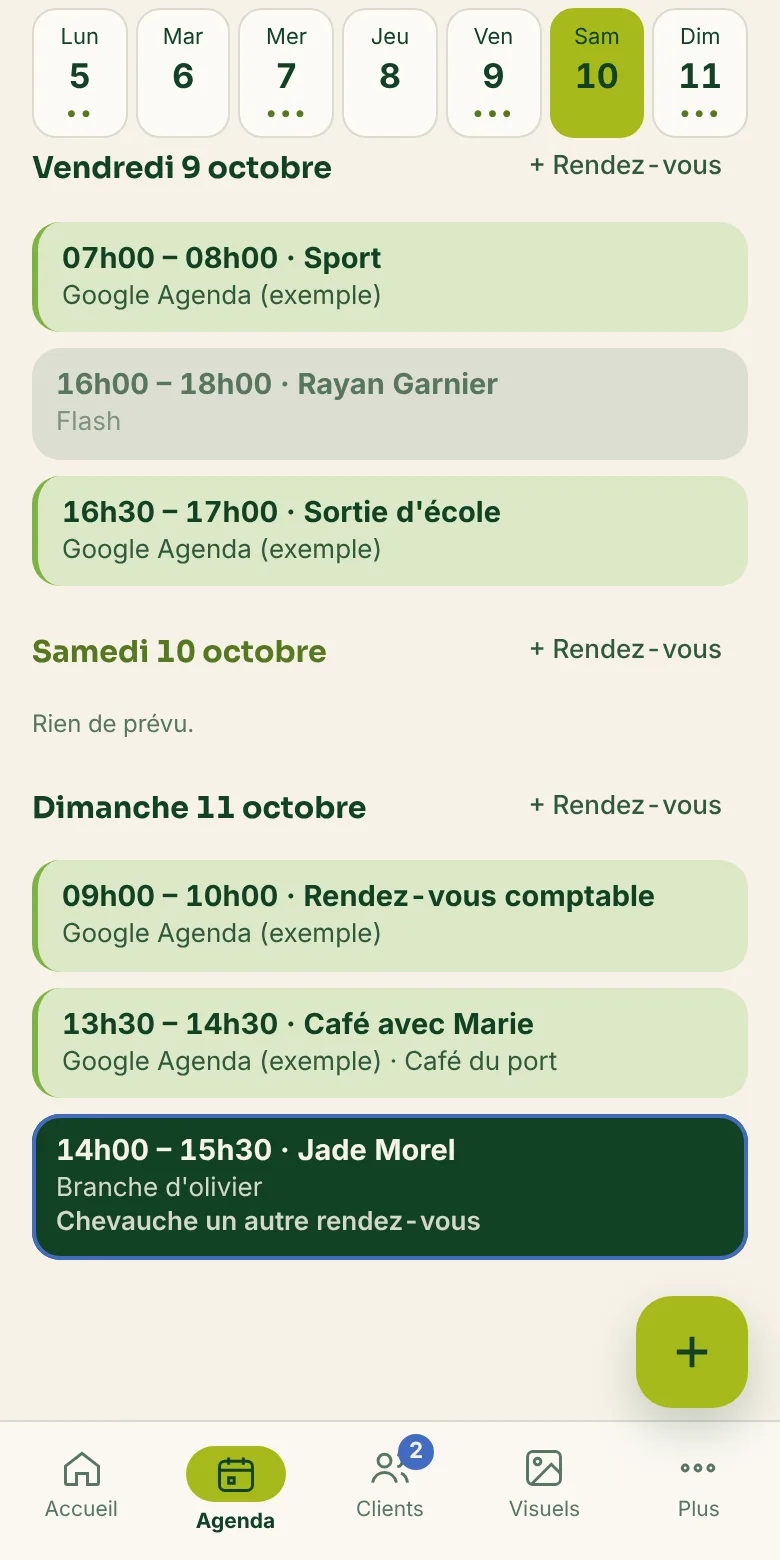
A calendar that knows your sessions
Nora’s calendar knows it’s Jade’s second visit, that the deposit is in and the consent form still needs signing. And since your personal appointments show up alongside, you’ll never book a three-hour session on top of the dentist again.
How does it work?
Four steps, just once.
- Connect your calendar
Google Calendar, Apple Calendar or Outlook. Several if you like. - Everything shows up together
Nora sessions and personal appointments in one view, no duplicates. - Your sessions go out
Subscribe your usual calendar to the Nora link: your confirmed sessions show up there. - You stay in control
Hide client names if other people can see your calendar.
In a studio, one shared schedule
- Everyone has their own calendarEach tattoo artist keeps their own appointments, clients and finances.
- The shared scheduleEveryone’s availability, visible to the whole studio.
- A single request linkThe client picks their tattoo artist, or “no preference”.
- A date freed upDeposit not paid 72 h before? The client is sent back to the calendar to pick another slot.

“When do I have a free slot?” Gizmo checks your Nora calendar and your personal appointments, and gives you the answer.
Before and after
- A paper planner at the studio, another one on your phoneOne calendar, on all your devices
- Sessions booked on top of personal appointmentsOverlaps flagged
- Client names visible on the family calendarClient names hidden if you want
- WhatsApp back-and-forth to find out who’s freeEveryone’s availability visible in the studio

Questions?
Which calendars does Nora sync with?
Google Calendar, Apple Calendar and Outlook. Your personal appointments show up next to your sessions, and your confirmed sessions appear in your usual calendar.
Does an appointment in two calendars show up twice?
No. The same appointment in two connected calendars only shows up once, and a Nora session copied into Google doesn’t appear twice.
Can I hide my clients’ names?
Yes. In your personal calendar, sessions can appear without the client’s name.
Does it work on phone and computer?
Yes. Nora works on phone, tablet and computer, and the calendar is the same everywhere.
Nora’s other features
From €14.90 a month, and everything is included in Premium.

Try Nora free for 14 days
Then from €14.90 a month. Launch offer: Premium at €24.90 instead of €29.90, locked in for life before January 15, 2027. Multi-artist studios are in the Pro plan. See the plans